How OK Alone kept teams connected during the global Microsoft outage
On November 12, 2026, a global Microsoft outage took Outlook, Teams and Copilot offline for more than a day, leaving many organizations without their usual way of reaching employees. For people who work alone or in remote locations, that gap is a safety issue as well as an inconvenience.
The problem began at about 1 p.m. Eastern Time and, according to Reuters, affected users in at least 74 countries and territories.
In reaction to the outage, Scott Witte, vice president of sales at OK Alone, told Shane Mercer of Canadian Occupational Safety that his first response was shock at how far it reached. The failure appeared to span the globe, from Asia to Europe and North America, and was not confined to a single region or system, even though organizations would normally expect fail-safes to limit that kind of impact.
What went wrong in the Microsoft outage, and how long recovery took
Microsoft said the outage was caused by servers becoming unexpectedly unavailable, not by a surge in traffic. Engineers restarted the affected servers and rolled back a recent configuration change. The company also said it had seen no sign of malicious or cyber activity.
By Friday morning, Microsoft reported recovery across North America and Europe and encouraging signs in Asia-Pacific. Some users still faced delayed email and intermittent access.
For any organization that relies on Outlook or Teams to reach its people, that is a long time to be out of contact. It is longest of all for employees working alone, who may have nobody nearby to pass on an urgent message.
Staying reachable when email is not an option
This is where OK Alone gives organizations a second channel. Team Broadcast lets administrators send an instant alert to their whole workforce, to a single team, to hand-picked individuals, or only to the people currently on shift. The message arrives as a push notification in the OK Alone app on the worker's phone, so it does not depend on an inbox or a Teams channel being available. OK Alone customers used Team Broadcast during the Microsoft outage to reach their teams.
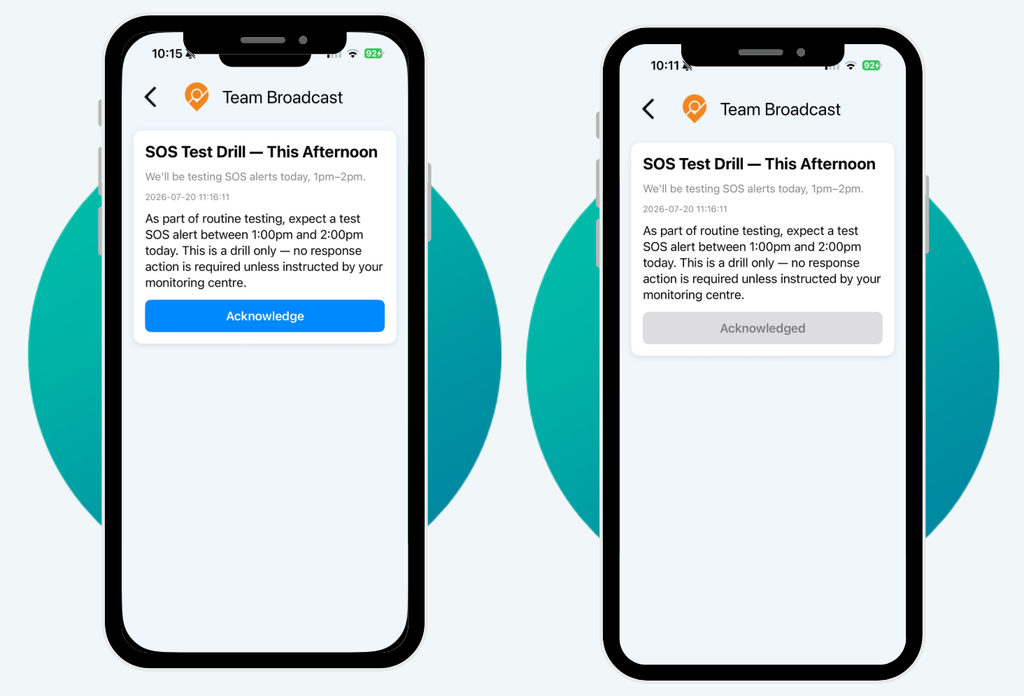
A broadcast has a short title, a one-line summary on the lock screen and a full message that opens in the app. Administrators set it to Normal or Critical. Critical broadcasts appear full-screen and override Do Not Disturb, so an urgent instruction is not missed on a silenced phone.
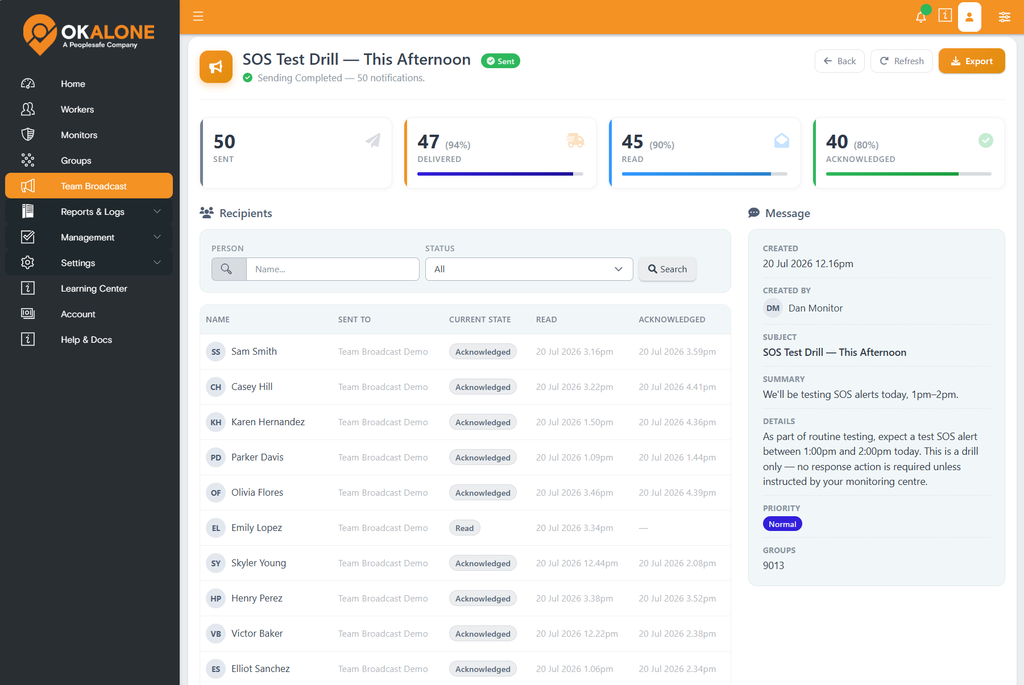
Team Broadcast also shows who has seen the message. Every broadcast is tracked as sent, delivered, read and acknowledged, and the dashboard shows each person's status. During an incident, that turns "we sent an alert" into a clear list of who is aware and who still needs a phone call. The full record can be exported afterward as evidence of duty of care.
The everyday safety features sit in the same app. Workers can check in or request help at any time, independently of any broadcast, and check-in reminders can reach them by text message or phone call as well as email (if available).
Team Broadcast is designed for one-way alerts with acknowledgement rather than a conversation, so it works best as one layer in a wider communication plan.
Test your backup plan before you need it
Storms, floods, wildfires and site emergencies are the situations most employers plan for, and they usually come with some warning or a known season. A technology failure rarely does. Witte advises employers to audit the protections they already have and to plan for the possibility that a layer could fail, so there is always another way to reach people.
He also urges organizations with lone workers to test their redundancy rather than assume it exists. In his view, the answer is to make sure the right processes and protocols are in place and practiced.
A practical first step is to send a test Team Broadcast to a small group, confirm it arrives, and check that everyone knows how to acknowledge it. Do it before the next Microsoft outage, not during it.
Sources
- Remote worker safety gaps exposed by global Microsoft outage, Shane Mercer, Canadian Occupational Safety, November 13, 2026



Stacey Manclark
As an expert in lone worker content management, I possess an extensive knowledge base and experience in the area of lone working and safety monitoring. My expertise in this field encompasses a wide range of areas, including risk assessment, training, communication, and technology. I have a deep understanding of the unique risks associated with lone workers and have researched and written many projects and articles to educate people in how to mitigate these risks.
Throughout my time with OK Alone, I have kept up to date with technological developments, legislative changes and regulations that have been introduced to help organizations ensure the safety of their lone workers.
Book a Demo Today
Alternatively, get a free trial of the app
Want to try OK Alone? Click the button below and enter your details. It's free and no credit card is required.
