Feature Usage Pop-ups: Helping Reduce False Alarms
OK Alone’s latest update introduces Feature Usage Pop-ups, a smart new way to help workers manage their safety features more effectively and avoid unnecessary alerts.
Key Takeaways
- Feature Usage Pop-ups alert workers when features such as Shake for Help or Worker Down are being triggered frequently.
- Workers can review or disable the feature from the prompt, or dismiss it when the alerts are genuine.
- The update is designed to reduce accidental alerts and help teams focus on situations that need attention.
Smarter Safety, Less Disruption
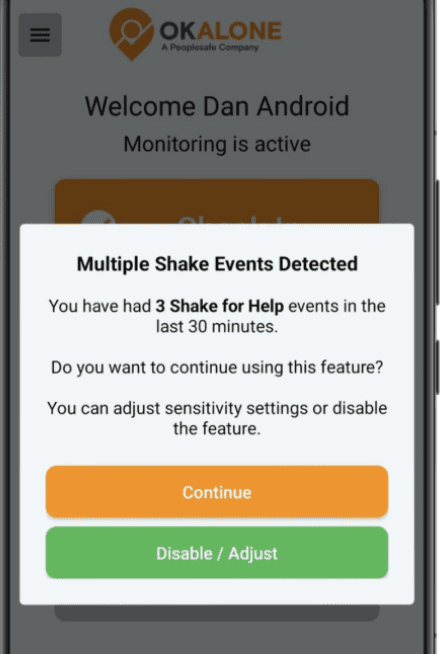
The system now keeps track of how often certain features — like Shake for Help and Worker Down (Man Down) — are triggered.
If these alerts are being activated too frequently, OK Alone will display a pop-up message suggesting the worker review or disable the feature.
This allows workers to make quick decisions on the spot — they can turn off the feature directly from the message or dismiss the prompt if the alerts are genuine.
Keeping Alerts Meaningful
This small but valuable improvement helps reduce false alarms, particularly when alerts are triggered by accident or when workers aren’t aware they can adjust their sensitivity settings.
By keeping OK Alone alerts accurate and intentional, teams can focus on genuine emergencies and maintain confidence in their safety system.
Peace of mind matters when you’re working alone. The new Active Feature Summary in OK Alone gives workers instant reassurance that their safety features are switched on and protecting them.
Instant Visibility, Ongoing Confidence
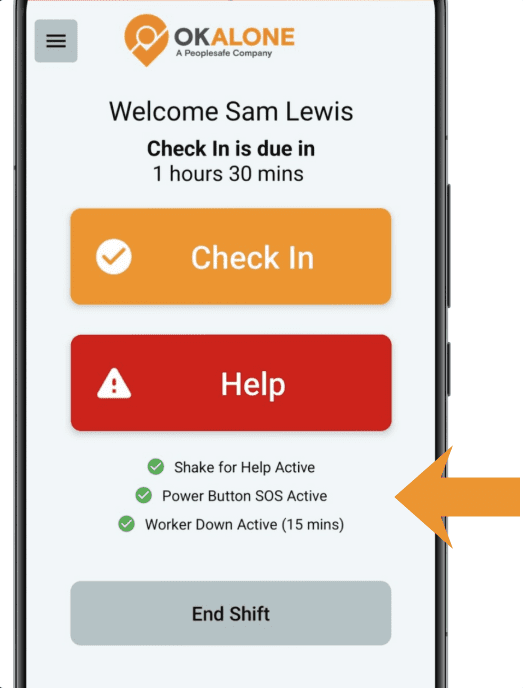
Now, whenever a worker is on shift, the main screen clearly displays a summary of all active safety features — including Shake for Help, Power Button SOS, Worker Down (Man Down), and Drive Mode.
Each active feature is shown with a green check icon and a short description, making it easy to see at a glance that everything is functioning as it should.
Simple, Effective, and Reassuring
This quick visual confirmation helps workers feel confident that OK Alone is running properly in the background, ready to respond if needed. It also reinforces awareness of the different ways the system keeps them safe during every shift.
No extra steps, no guesswork — just clear confirmation that their protection is live.
Peace of mind matters when you’re working alone. The new Active Feature Summary in OK Alone gives workers instant reassurance that their safety features are switched on and protecting them.
Key Takeaways
- Active Feature Summary shows which OK Alone safety features are enabled while a worker is on shift.
- The main screen can display Shake for Help, Power Button SOS, Worker Down, and Drive Mode with a green check icon and short description.
- The summary helps workers confirm their active protection at a glance without extra steps.
Instant Visibility, Ongoing Confidence
Now, whenever a worker is on shift, the main screen clearly displays a summary of all active safety features — including Shake for Help, Power Button SOS, Worker Down (Man Down), and Drive Mode.
Each active feature is shown with a green check icon and a short description, making it easy to see at a glance that everything is functioning as it should.
Simple, Effective, and Reassuring
This quick visual confirmation helps workers feel confident that OK Alone is running properly in the background, ready to respond if needed. It also reinforces awareness of the different ways the system keeps them safe during every shift.
No extra steps, no guesswork — just clear confirmation that their protection is live.
OK Alone continues to evolve to make lone worker safety simpler, faster, and more reliable. Two key features — Shake for Help and Worker Down (Man Down) — have now been upgraded to deliver better accuracy and fewer false alarms, helping workers stay protected without unnecessary interruptions.
Smarter Shake for Help Detection
The upgraded Shake for Help system is now more precise, responsive, and dependable than ever before. It’s been enhanced to better distinguish between intentional shaking and everyday movement such as walking, running, or driving — greatly reducing false alarms while ensuring fast response in real emergencies.
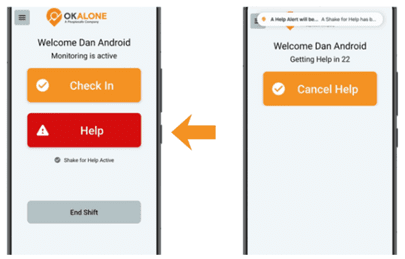
Workers can now choose between two activation modes, depending on what’s most appropriate for their situation:
- Alarm Mode: Triggers a loud audible alarm when activated, signalling that help is being sent and potentially deterring an attacker.
- Discreet Mode: Silently sends the alert — ideal when a worker needs to remain unnoticed.
Shake for Help is designed to respond only to deliberate, emergency-type movement. The following actions will reliably start the alert countdown:
- Vigorous shake – Hold the phone firmly and shake rapidly back and forth
- Quick wrist flicks – Two to three fast flicks in succession
- Panic motion – Rapid up-down or side-side movement
- Emergency shake – Strong, intentional motion signalling distress
These improvements make Shake for Help more accurate and easier to rely on in day-to-day use. The countdown alert has also been refined for faster confirmation, giving workers confidence that their Help request will activate only when truly needed.
Enhanced Worker Down Reliability
The Worker Down feature has also received a major update with a new motion confidence system that improves detection accuracy.
The app now looks for two motion signals within 10 seconds to confirm that a worker is active, avoiding resets from quick jolts or brief movements that don’t reflect real activity.
In addition, workers will now feel a vibration warning at 85% of the inactivity timer. This serves as an early reminder to move or check in before a full alert is triggered, reducing false activations while ensuring genuine inactivity is identified quickly.
Refined for Real-World Reliability
These improvements make both features more accurate and easier to trust in daily use. Workers can rely on OK Alone to respond effectively in real emergencies, while supervisors can be confident that alerts represent genuine concerns, not accidental triggers.
OK Alone continues to evolve to make lone worker safety simpler, faster, and more reliable. Two key features — Shake for Help and Worker Down (Man Down) — have now been upgraded to deliver better accuracy and fewer false alarms, helping workers stay protected without unnecessary interruptions.
Smarter Shake for Help Detection
The upgraded Shake for Help system is now more precise, responsive, and dependable than ever before. It’s been enhanced to better distinguish between intentional shaking and everyday movement such as walking, running, or driving — greatly reducing false alarms while ensuring fast response in real emergencies.
Workers can now choose between two activation modes, depending on what’s most appropriate for their situation:
- Alarm Mode: Triggers a loud audible alarm when activated, signalling that help is being sent and potentially deterring an attacker.
- Discreet Mode: Silently sends the alert — ideal when a worker needs to remain unnoticed.
Shake for Help is designed to respond only to deliberate, emergency-type movement. The following actions will reliably start the alert countdown:
- Vigorous shake – Hold the phone firmly and shake rapidly back and forth
- Quick wrist flicks – Two to three fast flicks in succession
- Panic motion – Rapid up-down or side-side movement
- Emergency shake – Strong, intentional motion signalling distress
These improvements make Shake for Help more accurate and easier to rely on in day-to-day use. The countdown alert has also been refined for faster confirmation, giving workers confidence that their Help request will activate only when truly needed.
Enhanced Worker Down Reliability
The Worker Down feature has also received a major update with a new motion confidence system that improves detection accuracy.
The app now looks for two motion signals within 10 seconds to confirm that a worker is active, avoiding resets from quick jolts or brief movements that don’t reflect real activity.
In addition, workers will now feel a vibration warning at 85% of the inactivity timer. This serves as an early reminder to move or check in before a full alert is triggered, reducing false activations while ensuring genuine inactivity is identified quickly.
Refined for Real-World Reliability
These improvements make both features more accurate and easier to trust in daily use. Workers can rely on OK Alone to respond effectively in real emergencies, while supervisors can be confident that alerts represent genuine concerns, not accidental triggers.
Frequently Asked Questions
The detection system has been refined to better distinguish deliberate emergency shaking from everyday movement, helping reduce accidental alerts.
Alarm Mode provides an audible alarm when triggered, while Discreet Mode sends an alert silently.
The updated motion-confidence approach looks for two movement signals within ten seconds before confirming that a worker is active.
The article states that a vibration warning occurs at 85% of the configured inactivity timer, giving the worker an early reminder.
The improvements aim to reduce false activations while maintaining effective alerts for genuine emergencies.




Stacey Manclark
As an expert in lone worker content management, I possess an extensive knowledge base and experience in the area of lone working and safety monitoring. My expertise in this field encompasses a wide range of areas, including risk assessment, training, communication, and technology. I have a deep understanding of the unique risks associated with lone workers and have researched and written many projects and articles to educate people in how to mitigate these risks.
Throughout my time with OK Alone, I have kept up to date with technological developments, legislative changes and regulations that have been introduced to help organizations ensure the safety of their lone workers.
Book a Demo Today
Alternatively, get a free trial of the app
Want to try OK Alone? Click the button below and enter your details. It's free and no credit card is required.
